You check an online home valuation calculator before breakfast and see a number that feels either encouraging or completely wrong. Your kitchen was remodeled, the basement is finished, and the house sits on a corner lot, yet the estimate may look as though the calculator knows only the address and a few public-record fields. That creates a practical question for Chicagoland homeowners: Is this a useful starting point, or should you ignore it?
The answer depends on what the calculator measured, how much comparable data exists nearby, and whether your property resembles the homes used to build the estimate. An automated valuation model can organize market information quickly, but a single number isn't the same as a listing strategy, appraisal, or likely negotiation outcome.
This guide will help you identify the type of tool you used, understand how the estimate was created, improve the information going into it, and recognize the situations where automation becomes less dependable. It also explains why a local, MLS-backed review can add important context for homes in Melrose Park, Elmhurst, Naperville, Oak Park, Downers Grove, Glen Ellyn, and surrounding communities.
Table of Contents
- Introduction to Home Valuation Calculators and What They Can Do
- Types of Home Valuation Tools You Will Encounter
- How a Home Valuation Calculator Builds Its Estimate
- Inputs That Improve Your Home Valuation Calculator Results
- How to Read Your Estimate Range and Confidence Score
- When Home Valuation Calculators Become Unreliable
- Automated Estimates Compared With a Local Comparative Market Analysis
- Quick Reference and Next Steps With Carmen
Introduction to Home Valuation Calculators and What They Can Do
A fast estimate is useful, but it isn't a pricing decision
A home valuation calculator can give you a quick sense of how the market may view your property. It can be helpful when you're deciding whether to explore a move, estimating available equity, comparing nearby homes, or preparing questions for a real estate professional.
The number becomes less useful when you treat it as a final answer. Buyers don't purchase an algorithmic estimate. They respond to a specific home, its condition, location, layout, presentation, and competition from other available properties. A seller also has to consider timing, offer terms, inspection concerns, and the price range that attracts qualified buyers.
Practical rule: Use an online estimate to begin the conversation, not to end it.
Consider a typical western-suburban situation. A homeowner in an older neighborhood checks a calculator and receives a value based largely on nearby recorded sales. The estimate may recognize the home's size and bedroom count, but it may miss a recent kitchen renovation, a poorly documented addition, a finished lower level, or the difference between a quiet interior street and a busy corner.
What this guide helps you decide
You don't need to reject automated tools. You need to know when their output deserves more confidence and when it needs a local review.
By the end, you should be able to:
- Identify the tool: Tell whether you used a portal estimate, lender-oriented model, county assessment, or agent-prepared comparative market analysis.
- Improve the inputs: Correct address, size, room count, condition, renovation, and lot information before relying on the result.
- Read the output: Look for a range, confidence signal, comparable evidence, and warnings about limited data.
- Spot risk: Recognize why custom homes, luxury properties, remodeled houses, lakefront locations, distressed homes, and thinly traded streets can confuse an automated model.
- Choose the next step: Decide whether the estimate is enough for casual planning or whether you need an MLS-backed pricing review.
The most useful question isn't, “What is my home worth?” It's, “What evidence supports this estimate, and what might the calculator be missing?”
Types of Home Valuation Tools You Will Encounter
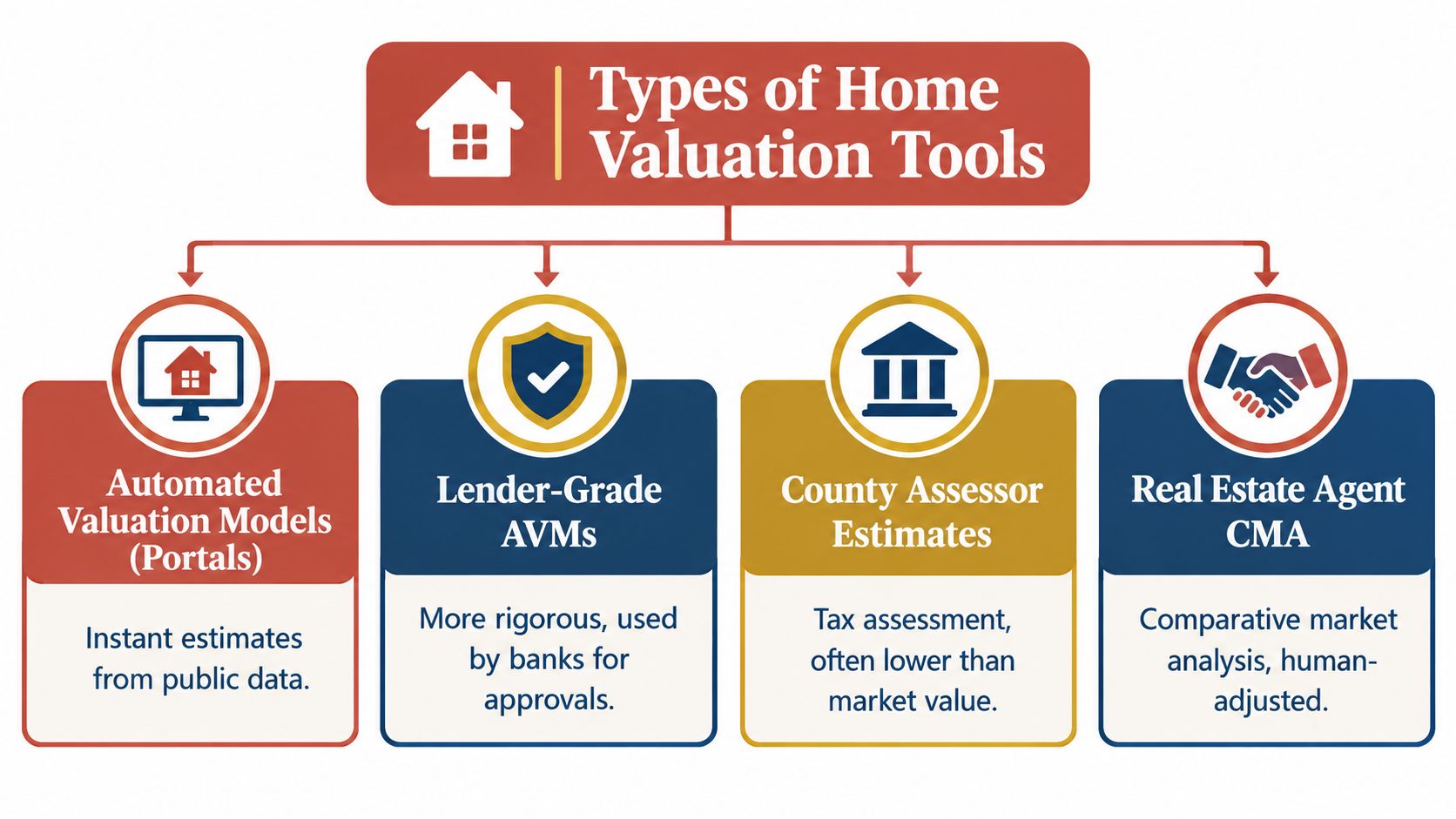
Not every home valuation calculator works the same way. Before comparing numbers, identify the category of tool that produced each estimate. Differences in data access, purpose, update practices, and personalization can make two results vary even when both use the same address.
Automated valuation models from consumer portals
These tools generate an immediate estimate from property records, recorded sales, characteristics, and broader market signals. They're designed for convenience and scale, so they can return a result without a property visit or a detailed conversation with the owner.
That makes them useful for orientation. It also means the model may not know about work that hasn't entered public records, an unusual floor plan, deferred maintenance, or a feature that local buyers value more than the broader dataset suggests.
Lender-grade automated models
A lender-oriented AVM is built for a financial institution's risk workflow. It may use more structured data and stricter quality controls than a casual consumer calculator, but it still produces a model-based opinion rather than a complete human inspection.
Banks use valuation information as part of lending and risk decisions. A homeowner shouldn't assume that a lender-grade model automatically captures every remodeling detail or neighborhood nuance.
County assessor estimates
County records support taxation, not necessarily a home's current open-market price. An assessor's figure can reflect a different purpose, schedule, methodology, and update cycle from a market-facing calculator.
Treat it as a public-record reference. It can help you verify basic property facts, but it shouldn't be the only evidence used to set an asking price.
Agent comparative market analysis
An agent-prepared comparative market analysis, or CMA, combines recent comparable sales with human review. The agent can inspect condition, evaluate renovations, distinguish one block from another, and adjust for factors that a model may not represent accurately.
The CMA still isn't a guaranteed sale price. It is a pricing opinion built around current competition, buyer behavior, comparable properties, and the home's market position.
| Tool category | Main purpose | Personalization | Best use |
|---|---|---|---|
| Consumer AVM | Quick automated estimate | Limited | Initial orientation |
| Lender-grade AVM | Structured lending analysis | Data-driven, still limited | Financial risk review |
| Assessor estimate | Tax administration | Record-based | Checking public facts |
| Agent CMA | Market pricing strategy | Human-adjusted | Preparing to sell or negotiate |
Two calculators can disagree because one may emphasize recent sales while another gives more weight to broader trends or records. A CMA can differ again because it accounts for visible condition and local context. The next questions are what data enters these systems and how the model turns it into a result.
How a Home Valuation Calculator Builds Its Estimate
A homeowner in Chicago's western suburbs might enter an address and see a value that seems precise. That number is an estimate produced from property records, nearby sales, and market signals. It reflects a model's calculated probability, not a direct observation of what a buyer will offer.
The information entering the model
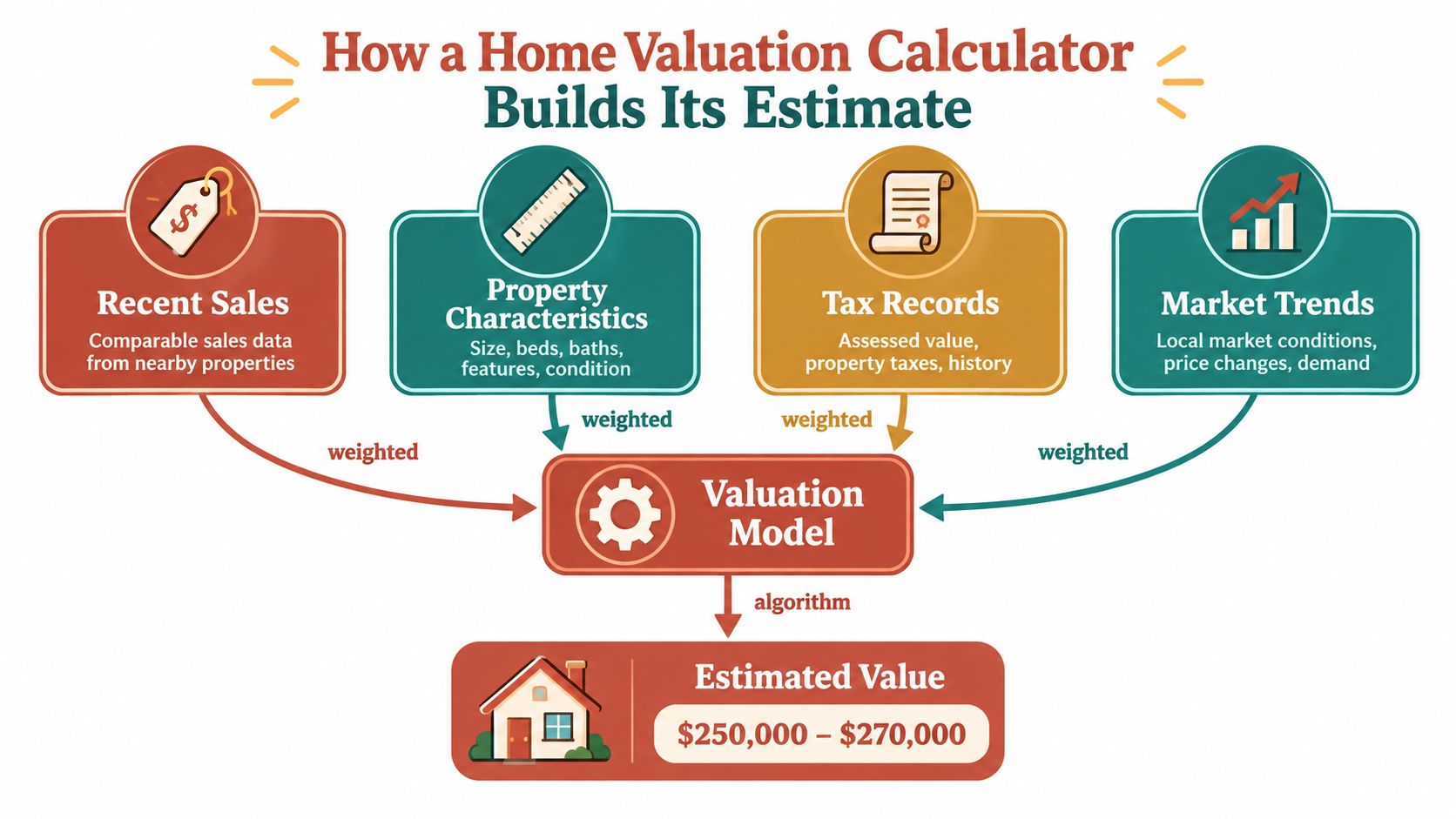
A calculator commonly reviews:
- Recent comparable sales: Nearby homes sold under open-market conditions show what buyers paid for properties with broadly similar features.
- Property characteristics: Square footage, bedrooms, bathrooms, building style, lot details, age, and recorded improvements help the model compare one home with another.
- Tax and public records: These sources may provide construction details, ownership history, assessed information, and physical attributes.
- Market conditions: Broader and neighborhood-level signals help account for changing demand and recent price movement.
The model gives greater weight to some sales than others. A recent sale of a similar home nearby generally offers stronger evidence than an older sale of a substantially different property. Data relevance, quantity, and recency all affect the result. A subdivision with many comparable transactions may produce a clearer estimate than a street with few sales.
A unique or remodeled home can expose the limits of that comparison process. A custom floor plan, high-end renovation, coach house, unusual lot, or converted space may have no close match in the available records. In a thin market, the calculator may stretch across neighborhoods or rely on older sales, making the result look more certain than the evidence supports.
Why disciplined modeling matters
The IAAO standard on automated valuation models describes a disciplined process for developing and validating AVMs. A sound workflow defines the model, calibrates it, tests performance, adjusts its specifications, and repeats quality checks.
Validation should include sales the model did not use to build the estimate, through holdout samples or cross-validation. It should also examine whether unusual sales or outliers influence the result too heavily. A model can perform reasonably across a broad area while producing a weak estimate for a specific home type.
The output should show more than a point estimate
A single price conceals uncertainty. A more useful calculator may provide a valuation range, confidence measure, comparable evidence, or a warning that manual review is appropriate.
Several fresh sales of similar homes provide a stronger foundation than distant or dissimilar properties. A local MLS-backed review can then examine details the model may miss, such as renovation quality, buyer appeal, block-level differences, and current competition.
Location-specific amenities also require local interpretation. This guide to neighborhood amenities that increase your home's value explains why an amenity's effect depends on the surrounding market and comparable evidence.
Inputs That Improve Your Home Valuation Calculator Results
A calculator can't correct information it never receives. Before entering your address, gather the details that describe the home as it exists today, then compare those details with public records.
Start with the physical facts
Use the exact street address rather than relying only on a ZIP code or neighborhood name. A few streets can separate homes with different buyer demand, school access, traffic patterns, lot sizes, and housing styles.
Check the recorded square footage against reliable documents or a professional measurement. Don't automatically include an unfinished basement, enclosed porch, storage area, or unpermitted addition as above-grade living space. A finished area may contribute value, but it may not be treated the same way as standard living area.
Lot size deserves the same care. A corner lot, irregular parcel, deep backyard, or limited-access side yard can affect appeal, but the calculator needs the underlying land information to recognize the property correctly.
Correct the room and condition details
Count bedrooms and bathrooms consistently. A room without the required egress, a partial bath, or a converted space may not qualify the way an owner expects. Verify what the public record says, then identify discrepancies rather than entering the most favorable number.
Condition and improvements are often where automated results fall short. Note a remodeled kitchen, updated bathrooms, replacement roof, new mechanical systems, windows, finished basement, or major exterior work. A calculator may not see those changes if records weren't updated or if the tool doesn't accept detailed condition information.
A new kitchen can change buyer perception even when the public record still describes the home exactly as it did before the renovation.
Keep the data market-focused
Don't add personal property such as furniture, artwork, collectibles, or decorations. Those items may matter to you, but they generally aren't part of the estate value being estimated.
Before accepting the result, compare the property profile with nearby sales. If the calculator selected homes with different layouts, conditions, or locations, the output may require adjustment. Improving presentation can also help before a human review, and these curb appeal ideas for homeowners offer practical preparation guidance.
How to Read Your Estimate Range and Confidence Score
Suppose a calculator shows a home near $400,000, but the estimate comes with a broad range and a low confidence score. That display is not a contradiction. It means the system found a starting point, while also recognizing that the available evidence may not support a precise conclusion.
A range describes uncertainty
The lower and upper boundaries reflect normal differences among comparable sales, along with differences between those homes and the property being evaluated. A narrow range usually means the home resembles several recent sales and the records provide a reasonably consistent picture. A wide range signals more uncertainty.
That wider spread can result from limited comparable sales, incomplete or inconsistent property information, unusual construction, a distinctive layout, or changing market conditions. A remodeled bungalow in Oak Park, for example, may not fit neatly beside nearby sales if the available records do not describe its updates accurately.
Use the range to form a pricing hypothesis, not to select the highest number that supports a preferred asking price. Test it against current competition and recent local sales. The range is a boundary around the model's opinion, not a promise about the eventual contract price.
Confidence measures need context
Confidence measures usually reflect the relevance, quantity, and recency of comparable data, or the amount of variation in the model's forecasts. In plain language, confidence should rise when the system has useful, nearby, recent evidence. It should fall when the evidence is sparse, old, or poorly matched.
The IAAO AVM standard supports reviewing reliability measures alongside a point estimate. A confidence score is not a guarantee. It helps show whether the result can serve as an initial reference or deserves manual verification before you make a pricing decision.
Industry discussions may use P10, the share of estimates that fall within plus or minus 10% of the eventual sale price, to evaluate model performance. A broad benchmark describes a model's overall behavior, though it cannot resolve the details of one Chicago-area property. A property-specific review still matters more when the home is unique, substantially remodeled, or located where comparable sales are limited.
| Signal | What it means | Action to take |
|---|---|---|
| Tight range | The model finds relatively consistent evidence | Review the comparable sales and use the result as an initial reference |
| Wide range | The property or market has greater uncertainty | Request a local comp analysis before setting a price |
| High confidence | Available data appears relevant and sufficient | Confirm condition and renovations before relying on it |
| Low confidence | Data may be sparse, old, or mismatched | Treat the estimate as directional only |
| No confidence detail | The tool offers little transparency | Avoid anchoring on the single number |
Translate the estimate into a decision
An estimate of $400,000 does not mean the home will sell at exactly that price. The provided research describes potential off-market misses of $8,000 to $28,000 at the stated error levels, as explained in coverage of AVM accuracy and boundary conditions.
Ask which sales support the result, whether they match the home's condition and layout, and whether current competition has changed the pricing environment. For a distinctive or recently remodeled home, a local MLS-backed review can examine those details directly and replace a broad automated signal with a more grounded pricing range.
When Home Valuation Calculators Become Unreliable
A Chicagoland home can look ordinary in a database yet compete very differently in person. A custom renovation, a corner lot, or only a few nearby sales can leave a calculator working from weak comparisons instead of a clear market pattern.
Unique homes create comparison problems
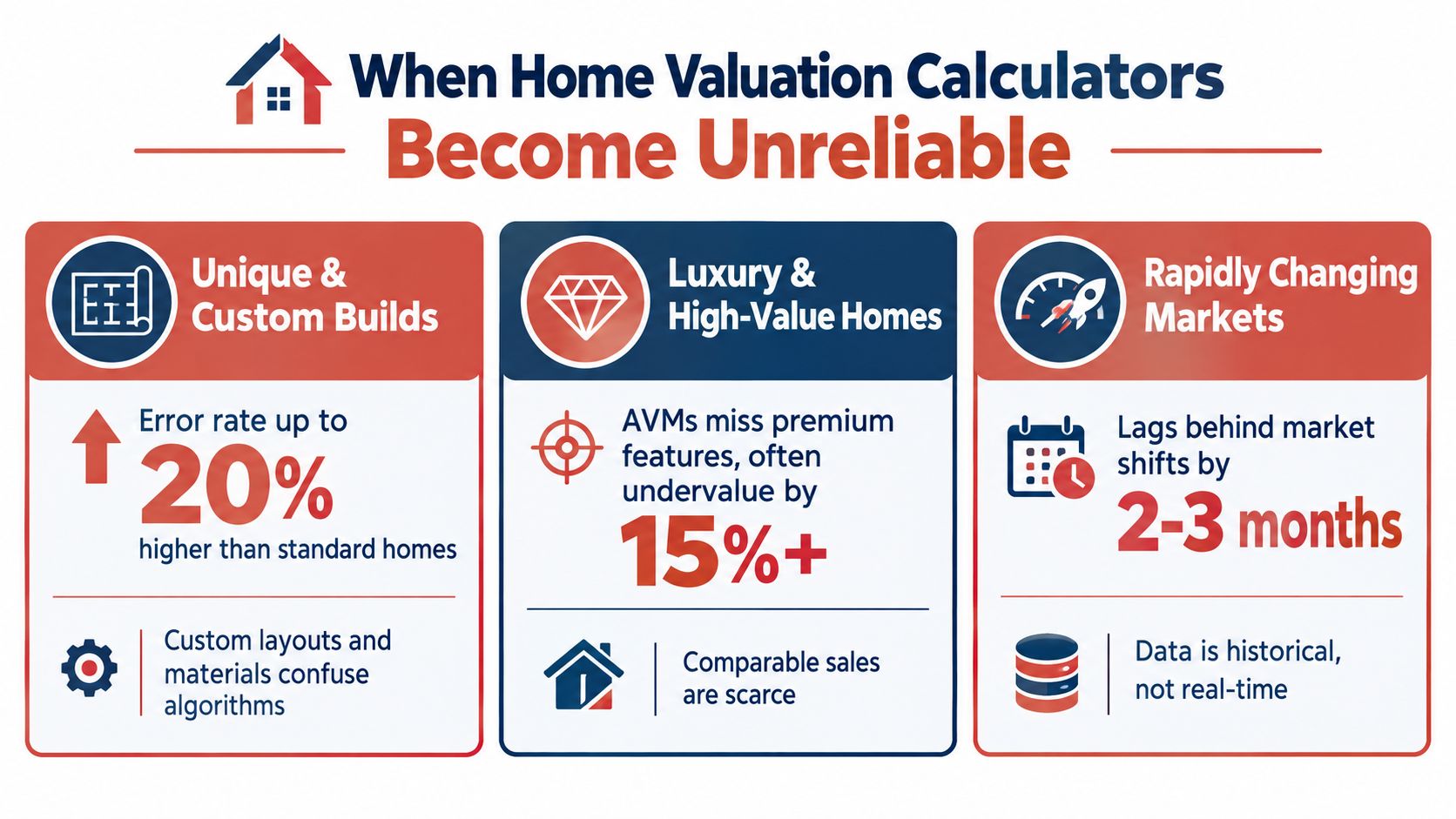
Custom builds, architect-designed homes, unusual floor plans, and specialized materials are difficult to match with standard records. A model may find properties with similar square footage while missing the value of craftsmanship, room flow, finish quality, or the buyers these features attract. If better matches are unavailable, it may compare a distinctive home with more conventional properties.
Remodeling creates a second gap. If the kitchen, bathrooms, mechanical systems, or lower level changed after the last public record update, the estimate may treat the home as outdated. The opposite can happen when records describe a larger or newer property than buyers encounter. In either case, the database does not fully reflect present condition.
Thin markets and premium properties weaken the signal
Luxury and high-value homes often have fewer closely comparable sales. The cited AVM accuracy analysis reports that luxury or thin-transaction properties can experience 10% to 20% error, while its reported off-market median error was 7.06% in the first quarter of 2026. These are broad benchmarks, not a prediction for one Chicago-area address. the AVM accuracy analysis
Other situations can distort the result:
- Corner lots: Traffic, visibility, access, and orientation can change buyer response from one block to the next.
- Lakefront or water-adjacent homes: Views, shoreline conditions, access, and site features may not fit ordinary comparable patterns.
- Inherited properties: Deferred maintenance, estate decisions, and occupancy conditions can produce a sale unlike a typical owner-occupied transaction.
- Distressed or as-is homes: Repair needs vary widely, and recorded sales may not separate condition differences clearly.
- Rapidly changing pockets: Older sales can lag behind what buyers currently accept or reject.
Know when to stop trusting the screen
A $400,000 estimate can miss by $8,000 to $28,000 at the off-market error ranges described in the cited coverage. For a seller, that gap can affect the listing position, buyer pool, appraisal risk, and room for negotiation.
Use the calculator as an initial signal, not the final pricing decision. If the home is unusual, recently remodeled, or surrounded by limited comparable sales, a local MLS-backed review can inspect condition, improvements, competing listings, and street-level differences before establishing a practical range.
When the property does not fit the database pattern, pause before pricing from the screen alone.
Automated Estimates Compared With a Local Comparative Market Analysis
Automation and local analysis answer related questions, but they don't perform the same job. An automated estimate asks what a model predicts from available data. A CMA asks how this specific property should be positioned against current competition and relevant closed sales.
The comparison at a glance
| Consideration | Automated estimate | Local CMA |
|---|---|---|
| Speed | Immediate or nearly immediate | Requires research and review |
| Data foundation | Structured records and modeled signals | MLS-supported sales, listings, and local market context |
| Property visit | Usually absent | May include visual condition review |
| Renovations | May be missing or generalized | Can be assessed in context |
| Micro-location | Depends on available data | Human interpretation of street and neighborhood differences |
| Negotiation strategy | Not included | Considers pricing position and likely buyer response |
| Unusual property | Higher risk of mismatch | Adjustments can reflect distinctive features |
A local CMA can distinguish between homes that appear similar in a database but compete differently in real life. A renovated property may warrant a different position from an outdated one. A home near a busy road may not attract the same buyers as a similar home on a quieter street. A finished basement, detached garage, lot orientation, or school and transit context can matter differently depending on the immediate market.
Why neighborhood density changes reliability
The same calculator may perform more consistently in a dense Naperville subdivision with many similar sales than in an older, lower-liquidity pocket where homes differ substantially and transactions are less frequent. Data density helps the model find comparable patterns, but it doesn't eliminate the need to verify condition and location.
The issue also has an equity dimension. Urban Institute research found that AVM valuation errors were 3.4 percentage points higher for Black homeowners than for white homeowners in Atlanta and Memphis, and that Black-owned homes were undervalued by about 5% on average. These findings are detailed in Urban Institute research on AVMs and disparities in home values. They show why consumers should question whether an apparently precise output reflects uneven data quality or market conditions.
Use both tools deliberately
Use automation for an early reference, record checking, and broad orientation. Use a local CMA when you're preparing to list, evaluating an offer, handling an inherited or as-is property, or dealing with a home whose features don't fit standard comparisons.
Homes By Carmen provides a complimentary property valuation and strategy consultation supported by local expertise and MLS access through Midwest Real Estate Data. The purpose isn't to replace every automated estimate. It's to test the number against neighborhood-level evidence, property condition, buyer expectations, and a practical selling plan.
Quick Reference and Next Steps With Carmen
A home valuation calculator becomes more useful when you treat the result as evidence to evaluate. Keep this short reference nearby when reviewing any estimate.
Essential terms
- AVM: An automated valuation model that estimates property value from data and statistical modeling.
- Comparable sale: A recently sold property used as evidence because it shares meaningful characteristics with the subject home.
- Confidence score: A measure indicating how reliable the model considers its estimate based on the available evidence.
- Valuation range: The lower and upper boundaries surrounding a central estimate.
- P10: A commonly used benchmark describing the share of estimates within plus or minus 10% of the eventual sale price.
- CMA: A comparative market analysis prepared by a real estate professional using sales, competition, and human adjustments.
Verify an online estimate
- Confirm the address and public facts. Check square footage, room count, lot information, age, and property type.
- List unrecorded improvements. Write down renovations, additions, finished areas, system replacements, and condition issues.
- Review the evidence. Look for nearby, recent, comparable sales rather than accepting the number alone.
- Read the confidence signal. A wide range or low-confidence result deserves additional review.
- Flag unusual circumstances. Custom construction, lakefront location, corner placement, estate ownership, distress, and sparse sales all require caution.
- Choose the decision level. Casual planning may need an estimate. Pricing, refinancing, or negotiation usually calls for stronger evidence.
Local research can also help you understand how buyer expectations differ across Melrose Park, Elmhurst, Downers Grove, Naperville, Oak Park, and Glen Ellyn. For homeowners considering a sale in Elmhurst, the guide to selling a house in Elmhurst provides another planning resource.
Prepare your address, recent improvement list, known property issues, preferred timing, and questions about comparable sales before requesting a review. Carmen can use that information to connect the automated starting point with local pricing strategy, while buyers can use the same framework to assess whether an asking price is supported by the market.
Homes By Carmen offers complimentary property valuations and strategy consultations for Chicagoland homeowners who want more than a generic online estimate. Visit Homes By Carmen to request a local review, discuss your property's condition and comparable sales, and turn a calculator result into a more informed pricing decision.