
If you've been bouncing between public portals, refreshing the same saved search, and wondering why good homes seem to disappear before you ever see them, you're probably searching too far from the source. In Chicagoland, that source is the MLS, and if you know how to search it well, you stop reacting to stale listings and start working from the same data agents use every day.
The modern MLS grew out of broker cooperation, not public classifieds, which is why it still runs on shared rules and structured data instead of a free-for-all feed. That history matters in Chicago, because a smart search in MRED, the local MLS, is really about learning how to ask better questions of the inventory, not just typing in a zip code and hoping for the best. Homes By Carmen's Glen Ellyn search page is a good example of a consumer-facing way to work from MLS-based data without losing the structure that makes the system useful.
Table of Contents
- Beyond Zillow What Searching the MLS Really Means
- Gaining Access Your Keys to the MLS Kingdom
- Mastering the Essentials Filtering for What Matters
- Advanced Search Tactics That Uncover Hidden Gems
- Decoding a Listing How to Read MLS Data Like a Pro
- Putting Your Search on Autopilot with Alerts
Beyond Zillow What Searching the MLS Really Means
Public portals make home hunting feel easy, but they also make it feel noisy. You get photos, snippets of facts, and a lot of homes that look close enough, until you click through and find the details are off, the status is stale, or the property isn't really the fit you thought it was.
MLS search is different because it comes from the professional database agents use. The modern system traces back to late 19th-century broker cooperation, and the term multiple listing service was coined in 1907, which explains why the platform was built as a shared, structured inventory for professionals rather than a public classifieds board NAR research guide on MLS history. That structure is why the search experience is so much more precise when you're inside the MLS workflow or using a brokerage site with direct MLS access.
In Chicagoland, that matters because the local market isn't one simple grid. A search for a house in Naperville, Oak Park, or Glen Ellyn often hinges on small differences in school boundaries, commute patterns, lot size, and property type. MLS data lets you filter for those realities instead of forcing every search through the same broad consumer lens.
Practical rule: search the MLS like a working database, not like a browsing app. The more specific your buyer's goals, the more important it is to work from the source that organizes listings by status, structure, and local rules.
The cleanest mindset shift is this. Stop treating search as passive scrolling, and start treating it as a filtering process that gets sharper every time you remove irrelevant inventory. That's the difference between seeing “a lot of homes” and finding the homes that deserve a showing.
Gaining Access Your Keys to the MLS Kingdom

Most buyers hear “MLS” and assume there's a secret login they're missing. There isn't, at least not for the public in the way people imagine it. Consumer guidance from NAR says MLS data is usually surfaced through brokerage websites or an agent, and its consumer survey shows sellers aren't all choosing the same path, with 31% preferring private listing networks, 39% preferring consumer real-estate websites, and 31% expressing no preference NAR consumer guide to the MLS.
That's why access is really a workflow question. If you want MLS-level visibility, you need either an agent feeding you listings directly or a brokerage site pulling from a direct MLS feed. In practice, that gives most buyers a better result than trying to stitch together information from multiple public portals that may not update at the same pace or show the same fields.
A solid brokerage search page can do a lot of the work for you. Homes By Carmen, for example, offers MLS-style search support that includes saved searches and alerts, which is the right kind of setup if you want direct data without having to live inside a backend system. Used well, that's not a limitation. It's a cleaner way to keep the data organized and the search moving.
For buyers who still want to do some of the legwork themselves, the best setup is simple.
- Use a direct MLS feed first. That keeps your search anchored to the listings agents are actually seeing.
- Treat public portals as a secondary check. They're useful for browsing, but they shouldn't be your only source.
- Ask how the listings are surfaced. If the site can't tell you where the data comes from, don't assume it's complete.
A straightforward way to think about it is this. You don't need every key to the backend, you need a reliable front door.
This guide to choosing a good real estate agent is useful if you're trying to figure out who should be setting up those searches for you and how hands-on you want the process to be.
Mastering the Essentials Filtering for What Matters
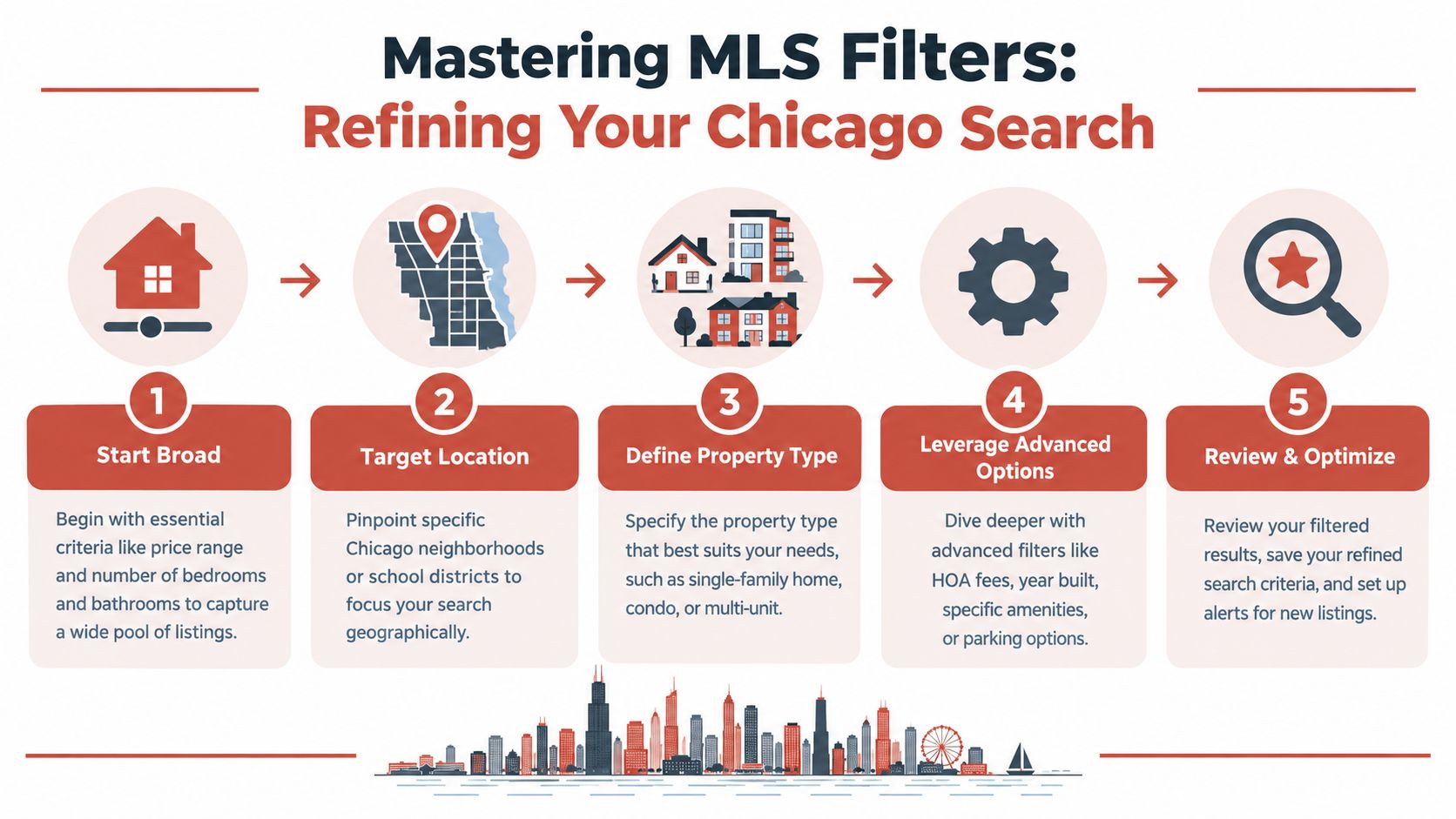
Start with the filters that refine your shortlist. Location, price range, property type, beds, baths, and status are the core inputs, and in a market as varied as Chicagoland, they do different jobs. A buyer looking in Naperville may need to prioritize school-boundary geography, while someone focused on Downers Grove may care more about station access and commute realism than a perfect kitchen.
Filter for what is truly available
Status is one of the first places people waste time. If you only want homes you can realistically pursue, focus on Active listings and be careful with statuses that signal the home already has an accepted offer or is moving through the contract stage. That one adjustment keeps you from building your hopes around homes that are no longer seeking new offers.
Use the property type before the price
A condo and a single-family home in the same suburb can live in completely different worlds once HOA fees, parking, and maintenance are factored in. If you're comparing options in the western suburbs, define the property type first, then sort the survivors by price and condition. Otherwise, you end up comparing homes that don't belong in the same conversation.
Search like a local, not like a keyword machine
Keyword fields help more than most buyers realize. A search for “fenced yard,” “finished basement,” or “first-floor primary” can surface homes that fit your life better than a basic beds-and-baths filter ever will. That matters in Chicago suburbs where the same house style can hide very different livability features.
Practical rule: start broad, then tighten. If you over-filter at the beginning, you can hide a home that would've worked after a small compromise on size, finish level, or lot setup.
A strong search workflow also means revisiting your criteria. If the results feel thin, loosen one filter at a time instead of changing five things at once. That keeps you from losing track of what improved the search.
Advanced Search Tactics That Uncover Hidden Gems

A family I worked with wanted a home near a specific train corridor, but they kept searching by city name alone. That kept surfacing homes they'd never realistically tour, plus plenty of listings that were technically close but functionally inconvenient. Once we switched to a map-based search and drew the actual area they cared about, the list changed immediately.
That's the point of advanced MLS searching. You're not just hunting by label, you're narrowing by real-life behavior. Flexmls help materials show that users can search by MLS number, address, text, date ranges, and map overlays, which gives you far more control than most buyers ever use Flexmls FAQs. In a typical buyer search that lasts 10 weeks, that kind of precision matters because you don't have time to keep chasing mismatched inventory Flexmls FAQs.
Draw the search area you actually want
Map search is one of the most underused tools in residential search. Instead of trusting a zip code or a broad suburb label, you can trace around the blocks, streets, parks, or school area that precisely fit your target. In a place like Oak Park or Glen Ellyn, that kind of custom boundary can matter more than the municipality name itself.
Use status changes as a clue
Some of the most interesting opportunities show up when a home changes status. A relisted property can mean the deal fell through, the first buyer couldn't perform, or the seller is back in play with a different strategy. You're not guessing at motivation, but you are seeing signals that a standard search can miss.
Track a single property the right way
MLS number searches are useful when a client sends a specific home and wants updates fast. Instead of trying to rediscover the property through general filters, you can follow the exact listing record and watch for changes in price, status, or remarks. That saves time and cuts down on confusion when similar homes are on the market.
This piece on pocket listings and seller upside also connects to the broader idea that the best inventory isn't always obvious from a casual search.
Decoding a Listing How to Read MLS Data Like a Pro
A listing sheet is only valuable if you know what matters on it. Public portals often flatten the details, but the MLS data record usually gives you the actual fields that shape price, timing, and risk. That includes the stuff buyers tend to ignore until after they're emotionally attached.
Read the timeline, not just the headline
One of the biggest mistakes is treating every listing like a fresh start. In MLS work, timing can tell you more than the marketing copy, especially when the property has been active before, taken off the market, or relisted. The label matters less than the full history.
Focus on the cost you'll actually carry
The complete monthly picture comes from more than the asking price. Annual property taxes and monthly HOA fees significantly affect affordability, especially for condos and townhomes. If you're comparing two homes with similar list prices, those recurring costs can flip the winner fast.
Verify what actually matters before you move
MLS data isn't immune to entry mistakes. A transaction-quality study found that MLS-reported prices differed from final closing prices in 8.75% of sales, with some prices overstated and some understated transaction-quality study on MLS errors. That's a strong reason to verify critical fields before you write an offer, especially if the property is distressed, investor-focused, or moving fast.
Don't assume the first data point is the final truth. Check the status, the price, and anything tied to concessions or taxes against another reliable record before you commit.
The strongest buyers treat the MLS sheet like a working document, not a promise. That habit catches problems early and keeps you from building an offer around bad information.
Putting Your Search on Autopilot with Alerts
Once your filters are tight, stop manually checking the same search over and over. Save the search, turn on alerts, and let the system notify you when a match appears. That matters most in fast-moving suburbs like Oak Park or Glen Ellyn, where a good listing can disappear into the pipeline quickly.
Keep your searches organized by purpose. One search can cover the ideal home, another can track a backup neighborhood, and a third can watch a narrower price band if you're adjusting expectations. If you let obsolete searches pile up, you'll create noise instead of clarity.
The best setup is simple. Build the search carefully, save it, and make sure the alert reaches you in a way you'll see. Then keep refining instead of restarting from scratch every few days.
If you want help building a sharper MLS search for Chicagoland, Homes By Carmen can set up search alerts, help you compare neighborhoods, and walk you through what the data is really saying before you tour a home. Visit Homes By Carmen to start a search that's built around the way you buy in this market.